Zendesk’s base storage often runs out faster than you’d expect. Discover how escalating costs and technical lock-in can trap your support budget-and how to break free.
For many customer support teams, Zendesk is the gold standard. It’s powerful, scalable, and-in 2026-increasingly expensive. While the advertised seat prices are clear, there is a silent cost that catches many admins off guard: storage.
As your team closes more tickets and handles more attachments, you eventually hit a ceiling. When that happens, the choice is often framed as a simple one: pay for more storage or delete your history. But in reality, it’s the beginning of a platform lock-in that can trap your budget for years.
The 10GB ceiling: Breaking down storage limits
Zendesk architecture splits storage into two main buckets: Data (SQL records like ticket text) and File (attachments like images, PDFs, and logs).
Every account starts with a 10GB base allowance for both. Beyond that, you get a small per-agent bonus that depends entirely on your plan tier.
| Plan Tier | File Storage Allowance | Per-Agent Bonus |
|---|---|---|
| Suite Team / Growth | 10 GB | + 2 GB / agent |
| Suite Professional | 10 GB | + 5 GB / agent |
| Suite Enterprise | 10 GB | + 10 GB / agent |
For a high-volume team, that 10GB base disappears fast. A single high-resolution screenshot or a short screen recording can be 50MB. Multiply that by thousands of tickets, and you’re suddenly staring at a “Storage Breach” notification.
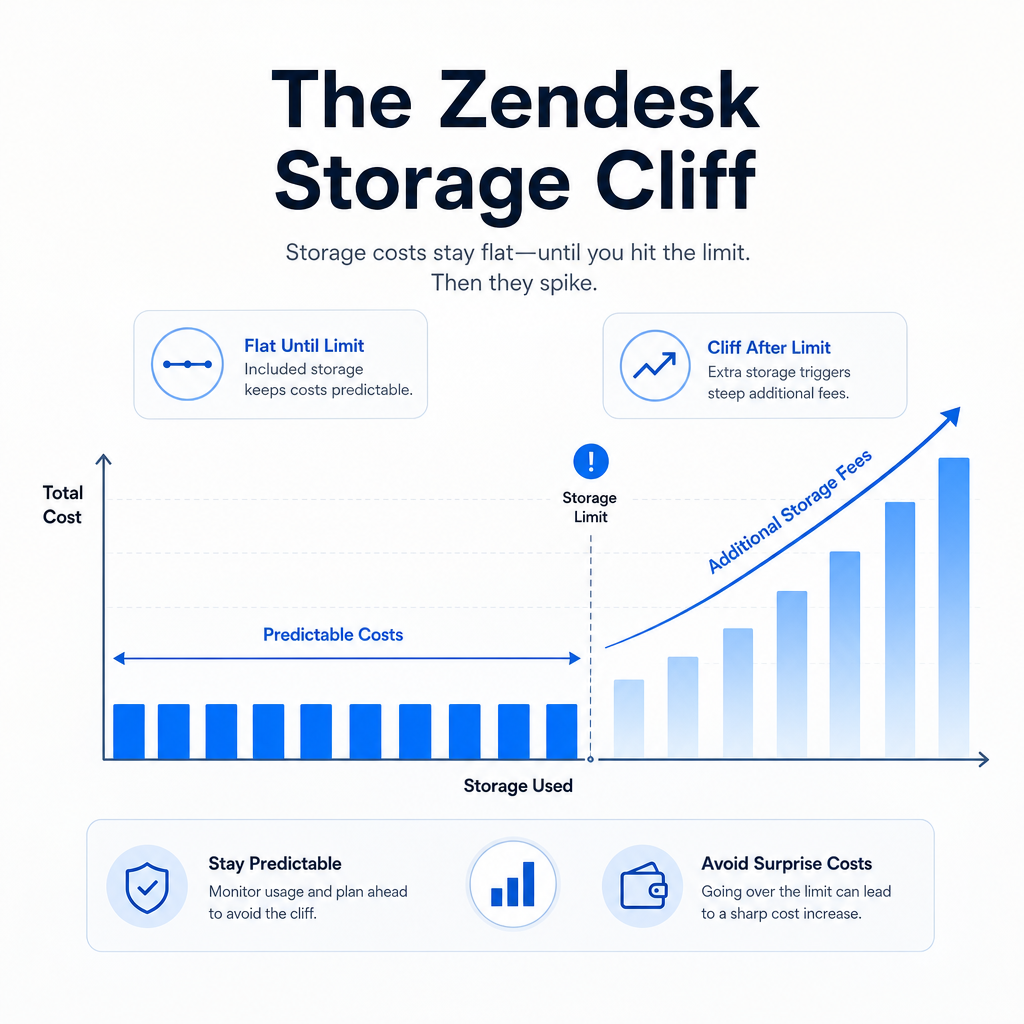
When you hit that limit, Zendesk doesn’t just ask you to upgrade; it sells you “units.” A single unit adds a fixed amount of data and file storage, but the pricing is designed for convenience, not efficiency. Compared to raw cloud storage from AWS or Azure, Zendesk’s native storage add-ons can be up to 100x more expensive.
The “hostile” notification: Admin frustrations
The technical limit is one thing; the enforcement is another. Across community hubs like Reddit and G2, a common theme has emerged: the “hostile” storage audit.
Administrators have reported receiving urgent emails from sales teams claiming they are in “breach of regulations.” These outreach efforts often come with tight deadlines-sometimes as little as a week-to either delete data or sign off on a significant price hike.
“The Zendesk team informed me that my account has exceeded storage limits… and we are ‘in breach of regulations’. This all came across very hostile and in a somewhat threatening manner… To me this seems like extortion.” - Zendesk Admin on Reddit
The frustration is compounded by a lack of visibility. In many tiers, admins have limited tools to monitor their own storage usage in real-time. You don’t know you’re in trouble until the audit hits your inbox.
Why you can’t just leave: The technical lock-in
If the costs are too high, why not just move? This is where “platform lock-in” becomes a reality.
Your ticket attachments aren’t just files; they are the context of your customer relationships. Deleting them to save money means losing the evidence of past issues, which is often a non-starter for compliance or quality assurance.
But migrating that data is a technical hurdle. Zendesk doesn’t provide a “one-click export” for years of attachments. Purging data while keeping the ticket text requires complex API scripts that most support managers don’t have the time or engineering resources to build.
The result? Teams stay on expensive, high-tier plans not because they need the extra features, but because they can’t afford the risk of losing their data.
Breaking the cycle: How to offload the burden
The solution isn’t to leave Zendesk-it’s to change where the data lives. By moving attachments to external storage, you can keep your history while slashing your bill.
This is exactly what our Zendesk Storage Offload Solution was built to do. Instead of paying Zendesk’s premium rates for file storage, you move those attachments to an external provider. This can either be your own storage like Amazon S3, Azure, or Google Cloud; or storage managed by us for a turn-key solution.
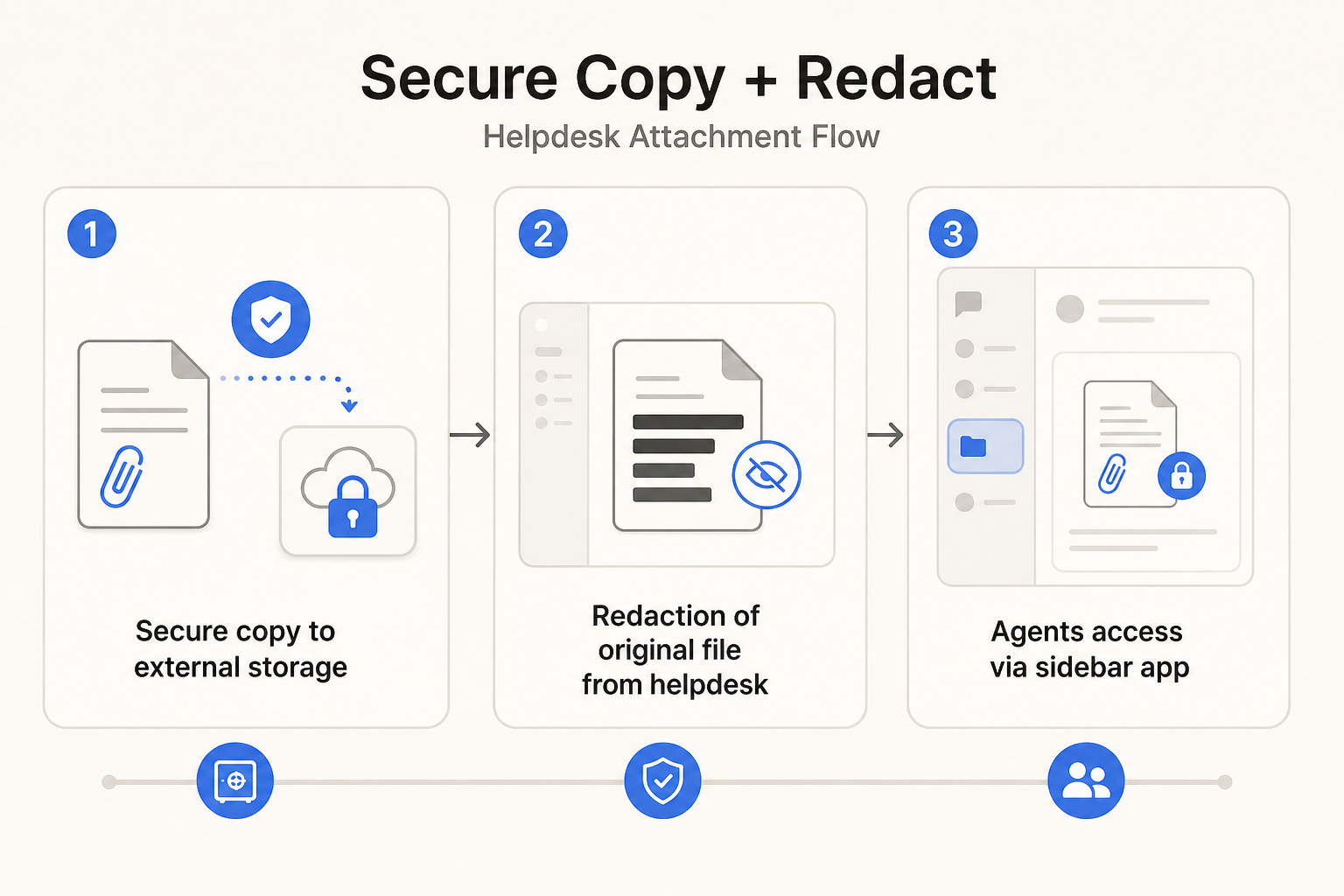
The workflow is designed to be completely invisible to your support agents:
- Secure Copy: The plugin automatically identifies attachments in closed tickets and copies them to your external storage.
- Redaction: The original file is deleted from Zendesk, instantly freeing up your storage quota.
- Sidebar Access: Agents retain access through the sidebar app with no change to their workflow.
Secure copy + redact: Compliance without the cost
For many enterprises, the hesitation around offloading is security. “If the file isn’t in Zendesk, is it still safe?”
The answer lies in Data Sovereignty. With a Hybrid storage model, you don’t just move data to a third party; you move it to your own cloud environment. Your attachments stay behind your own firewall, and controlled by you.
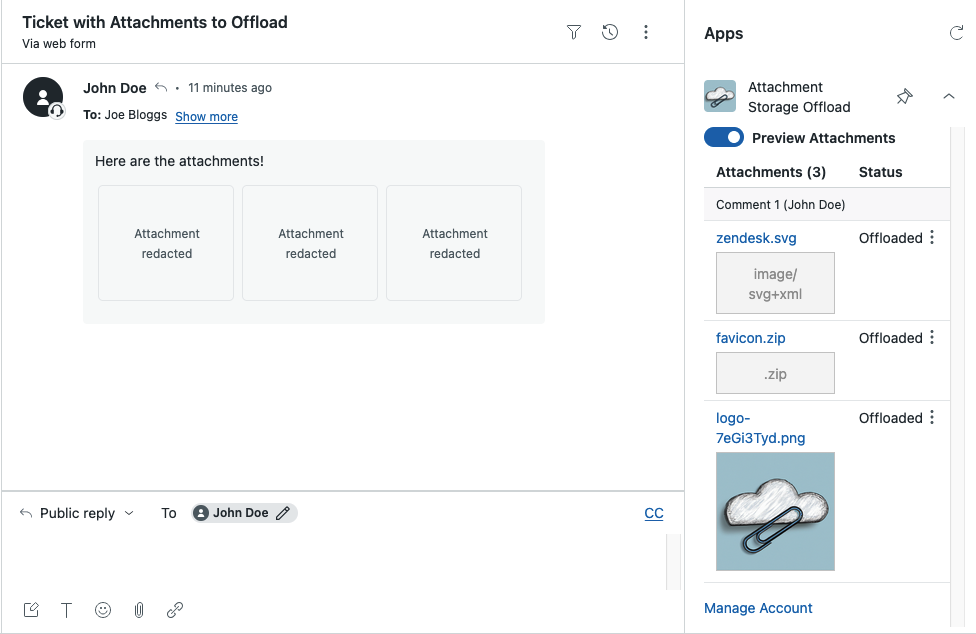
From the agent’s perspective, nothing changes. They still see the attachment in the Zendesk sidebar. They can preview it and download it just as they did before. The only difference is the reduction in cost.
Try our Zendesk Storage Offload Solution
If your Zendesk storage bill is starting to look like a mortgage payment, it’s time to look at an alternative. The Zendesk Storage Offloal Solution helps Zendesk admins reclaim their budget by offloading attachments to cheaper, secure storage-often resulting in a 90% reduction in storage fees.
Ready to break the lock-in? Get started with the Zendesk Storage Offloal Solution today and see how much you could save in under five minutes, or get in touch to organise a quick demo and quote.
Frequently Asked Questions
What are the default storage limits in Zendesk?
Most Zendesk accounts start with a 10GB base for both data and file storage. Depending on your plan, you get a small per-agent allowance-typically 5GB for Professional and 10GB for Enterprise tiers. For a detailed breakdown, see our storage limit analysis.
How much does additional Zendesk storage cost?
Additional storage is sold in ‘units’ that include 500MB of data and 25GB of file storage. These costs can scale rapidly, often proving 10x more expensive than external storage options like S3 or Azure. You can find more on pricing here.
What is Zendesk platform lock-in?
Lock-in occurs when the technical difficulty of managing or migrating years of ticket attachments makes it harder to switch providers. Deleting attachments to save space often requires complex API scripts, leading many teams to simply pay for higher tiers instead. Check out our offload solution to break the cycle.
Can I offload Zendesk attachments without losing access?
Yes. Using a plugin like Zendesk Storage Offload, you can securely copy attachments to your own cloud storage and redact the originals from Zendesk. Agents can still preview and download files directly within the Zendesk sidebar app. Learn how it works in our documentation.
Is offloading Zendesk attachments GDPR compliant?
It is, provided you use a secure, encrypted process. Solutions like Zendesk Storage Offload use industry-standard encryption and allow for ‘Data Sovereignty’ by letting you keep attachments in your own AWS, Azure, or other cloud storage environments. For more details, visit our security section.